


アクセアカフェ博多駅前店
- Store Information
- Facilities
- How to Use
博多駅前のコワーキングスペース、ノマドカフェ、ウェビナー、オンライン会議、テレワークに!
【重要】ブース席・ミーティングルームは予約制です。
通常会員(1ブースあたり)
1人用:55円(税込) / 15分
2人用:66円(税込) / 15分
プレミアム会員/法人シェアプラン/月額使い放題プラン
1人用:無料※
2人用:無料※
アクセアカフェ博多駅前店は、JR・地下鉄空港線・地下鉄七隈線より好アクセスな立地です。
●JR「博多駅」博多口より徒歩6分
●地下鉄空港線「博多駅」西18番出口より徒歩6分
●地下鉄七隈線「櫛田神社前駅」5・6・7番出口より徒歩4分
フリーWi-Fi、フリードリンク、全席電源完備のコワーキングスペースは30分からどなたでも気軽にお使いいただけます。
休憩はもちろん、勉強やお仕事、打ち合わせに。WEB会議や集中して作業したい時は個室型のテレワークブースもご利用可能です。
Store Information
〒812-0011 福岡県福岡市博多区博多駅前3-27-22 ガーデン博多駅前ビル1階
TEL: 092-710-5260
平日8:00〜22:00
土日祝10:00〜19:00
※店舗と営業時間が違うのでお気をつけください。
-
 Power Supply at Every Seat
 -
 Free Wi-Fi
 -
 Free Drinks
 -
 Outside Food & Drinks Allowed
 -
 Free Rental Items
 -
 Private Booths Available
 -
 Phone Call OK
 -
 Online Call OK
 -
 Conversation OK
* Bringing or consuming alcohol of any kind is not allowed.
* All seats are open for conversation, cell phone use, and online calls, but please be considerate of other patrons in terms of voice volume, etc.
Fees
| Plans | Regular fee | App Payment Fee | Thereafter |
|---|---|---|---|
| 30分 |
¥360 (in tax ¥396) |
¥220 (in tax ¥242) |
¥110 (in tax ¥121) /15 minutes |
| 3-hour package |
¥1,800 (in tax ¥1,980) |
¥1,100 (in tax ¥1,210) |
¥110 (in tax ¥121) /15 minutes |
| 9時間パック |
¥3,500 (in tax ¥3,850) |
¥2,750 (in tax ¥3,025) |
¥110 (in tax ¥121) /15 minutes |
* The fees listed is per person. charges apply for individuals aged elementary school and above.
Reservation Fees (Common to All Stores)
| Regular Member | Premium Members Corporate Shared Plan |
|
|---|---|---|
| Booth Reservation (Rate per Booth) |
1 person: 55 yen / 15 min | Free *(1)*(2) |
| 2 people: 66 yen / 15 min | ||
| Meeting Room Reservation (Rate per Room) |
4 people: 110 yen / 15 min | 4 people: 55 yen / 15 min |
| 6 people: 165 yen / 15 min | 6 people: 82.5 yen / 15 min | |
| 8 people: 220 yen / 15 min | 8 people: 110 yen / 15 min |
*(1) Each reservation can be up to 10 hours.
*(2) You can hold up to 3 reservations at the same time.
* Please note that café usage fees will be charged in addition to the reservation fee.
* This fee table is common to all stores. It includes rates for booths and rooms that may not be available at this location. Please check the "Facilities" section below for the facilities available at this store.
Facilities
Seats
テレワークブース・個室(1人席)5室
テレワークブース・個室(2人席)1室
ハイバックソファ席 5席
ソファ席 4席
テーブル席 6席
カウンター席 4席
Drinks
給茶器
カップ式自動販売機
Foods
電子レンジ
冷凍食品自販機
Free Rental Items
USB充電コード
USBハブ
充電器
マウス
延長コード
Printing Servicies
Access
●JR「博多駅」博多口より徒歩6分
●地下鉄空港線「博多駅」西18番出口より徒歩6分
●地下鉄七隈線「櫛田神社前駅」5・6・7番出口より徒歩4分
 テーブル席 10席
 2人個室ブース席 1つ
 カウンター席 4席
 ハイバック席 5席
 個室ブース 5つ
Check in and check out with the BizSPOT app
[Smart Lock Installed Stores]
-
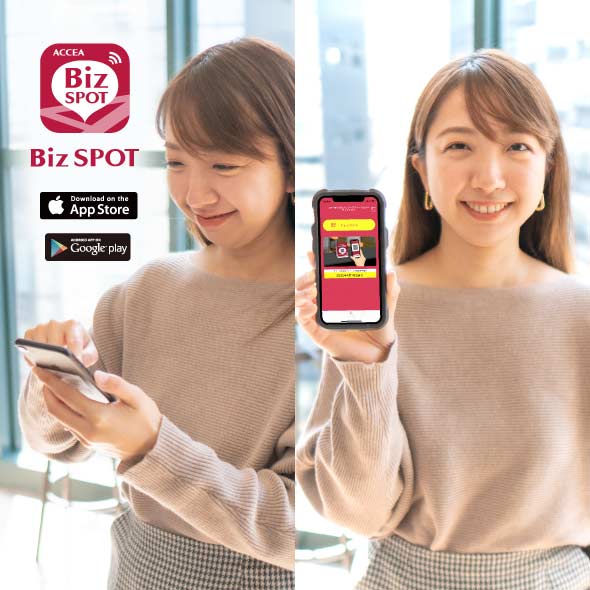 STEP1 App Download, credit Card Registration.
Please download the application BizSPOT, register your credit card information, and prepare the "Check-in" screen.
-
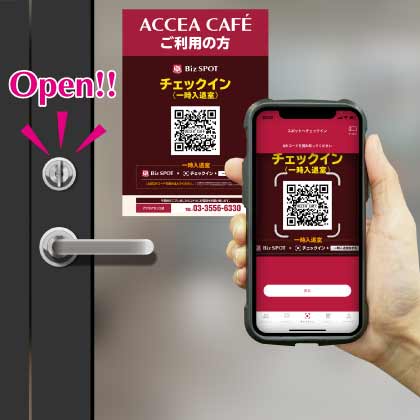 STEP2 Scan the QR code with the app to unlock the door and check-in.
Select the "check-in" function in the app. Tap the check-in button to scan the QR code, and select your plan. Please enter the store when the entrance door is unlocked.
-
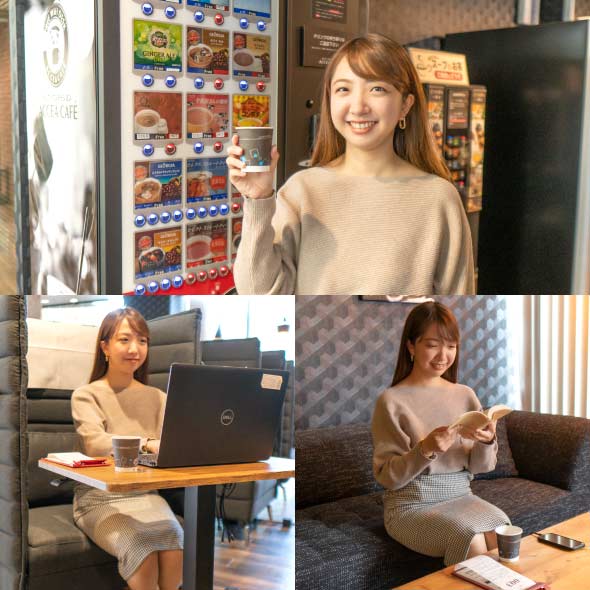 STEP3 Usage
Please feel free to use any available seat. You can also change seats during your usage.
-
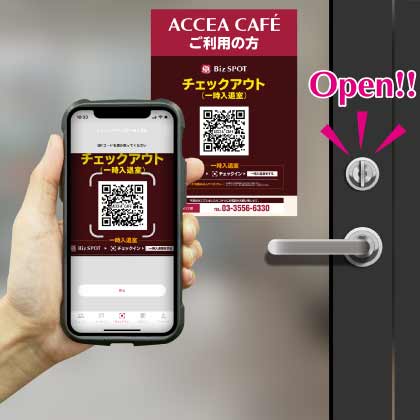 STEP4
STEP4Scan the QR code with the app to check out and unlock the door.
Temporary entry/exit during check-in
[Smart Lock Installed Stores]
-
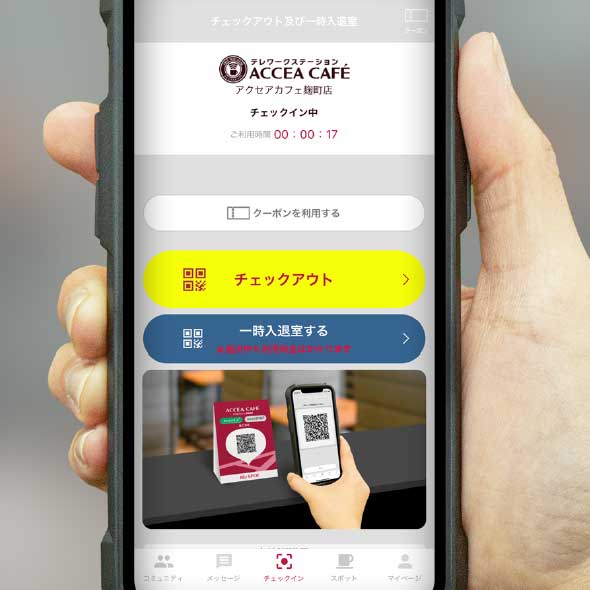 STEP1 Temporary Exit: Tap the Temporary Enter/Exit button
If you need to temporarily exit during your check-in, please tap the "Temporary Entry/Exit" button on the check-out and temporary entry/exit screen.
-
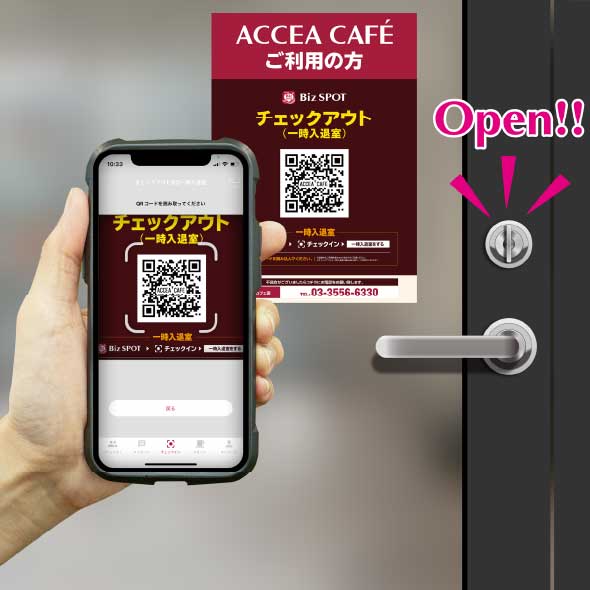 STEP2 Scan the temporary entry/exit QR code.
"Scan the temporary entry/exit QR code and please exit the store when the entrance door is unlocked.
*Please note that usage fees continue to apply even during temporary exits." -
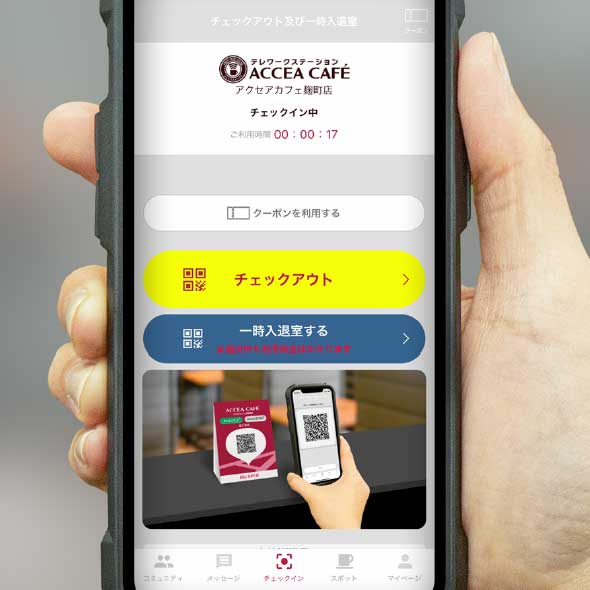 STEP3 Re-entry: Tap the temporary entry/exit button.
To re-enter the room, please tap the "Enter/Exit" button on the check-out and temporary entry/exit screens.
-
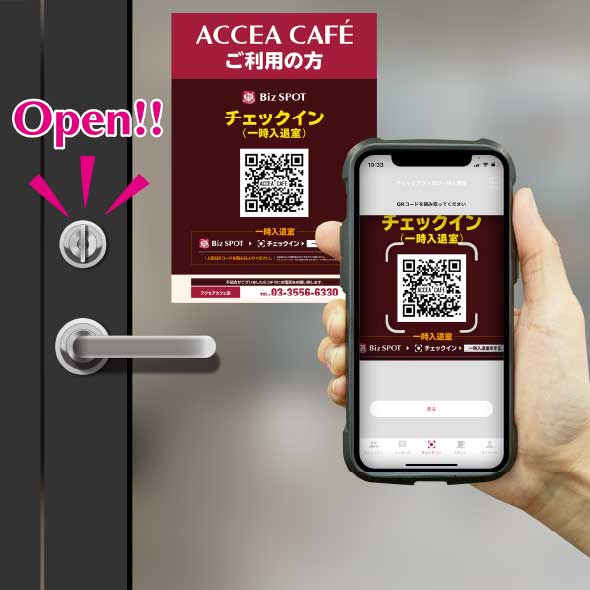 STEP4 Scan the temporary entry/exit QR code.
Scan the temporary entry/exit QR code and please re-enter when the entrance door is unlocked.